

The 10 Most Important SEO Metrics You Need to Analyze and Improve
To truly understand how effective your SEO efforts are, you need to study the data generated by the traffic you receive after implementing new tactics.
Simply looking at keyword rankings is no longer enough to evaluate the effectiveness of your work. To properly measure the ROI of your SEO methods, there are now numerous reports that should be analyzed.
In this article, we will look at the ten most important SEO metrics you need to consider when creating reports to evaluate your SEO success.
1. Clicks
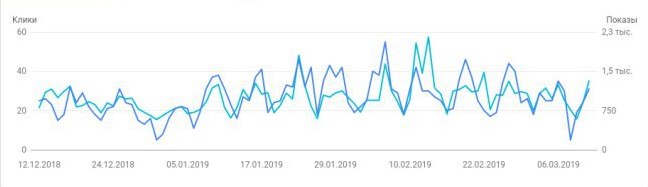
Starting with Search Console, you gain access to a report that tells you the number of organic clicks your site has received, as well as which search queries generated them. You can compare the number of clicks received each month to identify which search queries are responsible for the most traffic. This report will also allow you to identify which landing pages attract the most clicks and which page elements trigger them.

To access this report, go to “Search Traffic” in the Search Console and click on “Search Analytics.” You can also filter results by search type, allowing you to distinguish between image and text searches.
2. Goal Completions
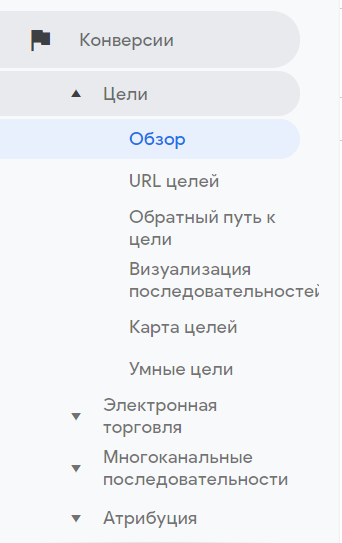
Understanding that your goals are being successfully met plays a huge role in assessing the value of your SEO campaign. You can create a report that identifies target values, conversion rates, and the number of goals achieved. By filtering the results for the report exclusively by organic traffic, you can calculate the ROI obtained from your unpaid SEO methods.
In Google Analytics, check the “Goals” and “Overview” sections under the “Conversions” tab. If you click “Add Segment” and select “Organic Traffic” from the list, you can clean up the report to exclude paid or inorganic searches.
3. Bounce Rate
If someone visits a single page on your website and then leaves, Google Analytics will report a 100% bounce rate or a single bounce, depending on the type of report you are viewing. Depending on what your site is designed for, a high bounce rate can be either positive or negative. A high rate might indicate that the information on your site is not exactly what your users are looking for, causing them to leave. On the other hand, a search query might lead a user to the exact page on your site that immediately answers their needs, making visits to other pages unnecessary.
To view the bounce rate of your landing pages, go to “Behavior,” “Site Content,” and “Landing Pages.” If you want to view only organic traffic, be sure to filter it.

4. Exit Pages
Knowing which pages visitors are leaving your site from helps you better understand the information presented on those pages. What is wrong with the top-ranking exit pages, and why aren't they compelling your visitors to continue to other pages? Is this the desired effect, or do you need these pages to better sustain user engagement? By testing different configurations of these pages, you can better achieve the desired result.
To get an exit page report, go to “Behavior,” “Site Content,” and “Exit Pages.”

5. Keyword Rankings
As mentioned at the beginning of the article, keyword ranking is no longer the sole metric to track for understanding SEO performance. However, it still plays an important role in acquiring traffic. By understanding which keywords drive the most traffic to a target site, you can improve your chances of reaching the top of the search engine results page (SERP) without relying on paid marketing methods.
Using the “Queries” report in Search Console, you can see which keywords your site ranks for, the number of impressions they get, the click-through rate (CTR), and their average position in Google.
6. Mobile Usability
Google has repeatedly stated that websites that perform slowly or poorly for smartphone/tablet users will rank lower in search results. Understanding where mobile users are having navigation issues on your site can help you reorganize and adapt accordingly.
To get a mobile usability report, go to the “Search Traffic” section in Search Console and select “Mobile Usability.”

7. Lifetime Value (LTV)
Access to the Lifetime Value report allows you to gauge the value of a unique user relative to your business goals. This is a relatively new report offered by Google Analytics that can predict the potential profit of a user coming to your site through various acquisition channels. Metrics per user you can select include app views, goal completions, page views, revenue, session duration, sessions, and transactions.
To access this data, click on “Audience” and “Lifetime Value.”

8. Crawl Errors
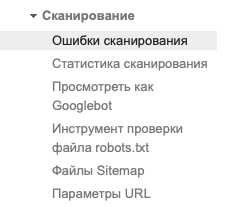
If Google cannot successfully crawl your site, your chances of appearing in search results are slim. By understanding which pages are preventing Googlebots from crawling your site, you can restore them and return them to normal functioning. By monitoring the Crawl Errors report, you can fix issues before they seriously impact page rankings.
Open the Crawl Errors report by clicking “Crawl” and “Crawl Errors” in Search Console.
9. Accelerated Mobile Pages (AMP)
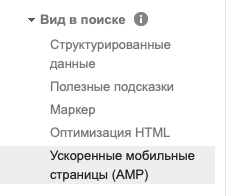
AMP pages should play a role in your site design to create fast-loading web pages for mobile users. Google's introduction of AMP has allowed website developers to significantly improve speed and user experience for mobile devices by providing an easy-to-use framework for creating mobile pages.
To view pages on your site that have AMP issues, click “Search Appearance” and “Accelerated Mobile Pages” in Search Console.
10. Backlink Quality
Backlinks have always played a big role in SEO, but over time, their quality has become much more important than quantity. Assessing the quality of inbound links allows you to evaluate off-page SEO efforts and develop more appropriate link-building campaigns to increase your traffic.
To access the inbound links report, click “Acquisition,” “All Traffic,” and “Referrals” in Google Analytics.